Teams Shifts
Teams Shifts manage your support staff's availability by scheduling shifts with assigned contacts, rotation types, and escalations. Here you'll Learn how to configure them for efficient team management.
Importance of Teams Shifts
Centralized Availability Management: View team availability in a calendar, including shifts, rotations, and escalations.
Flexible Scheduling: Define shifts by days, hours, and rotation types to fit operational needs.
Efficient Resource Allocation: Sync shifts with contacts and job positions to ensure proper scheduling.
Required Information
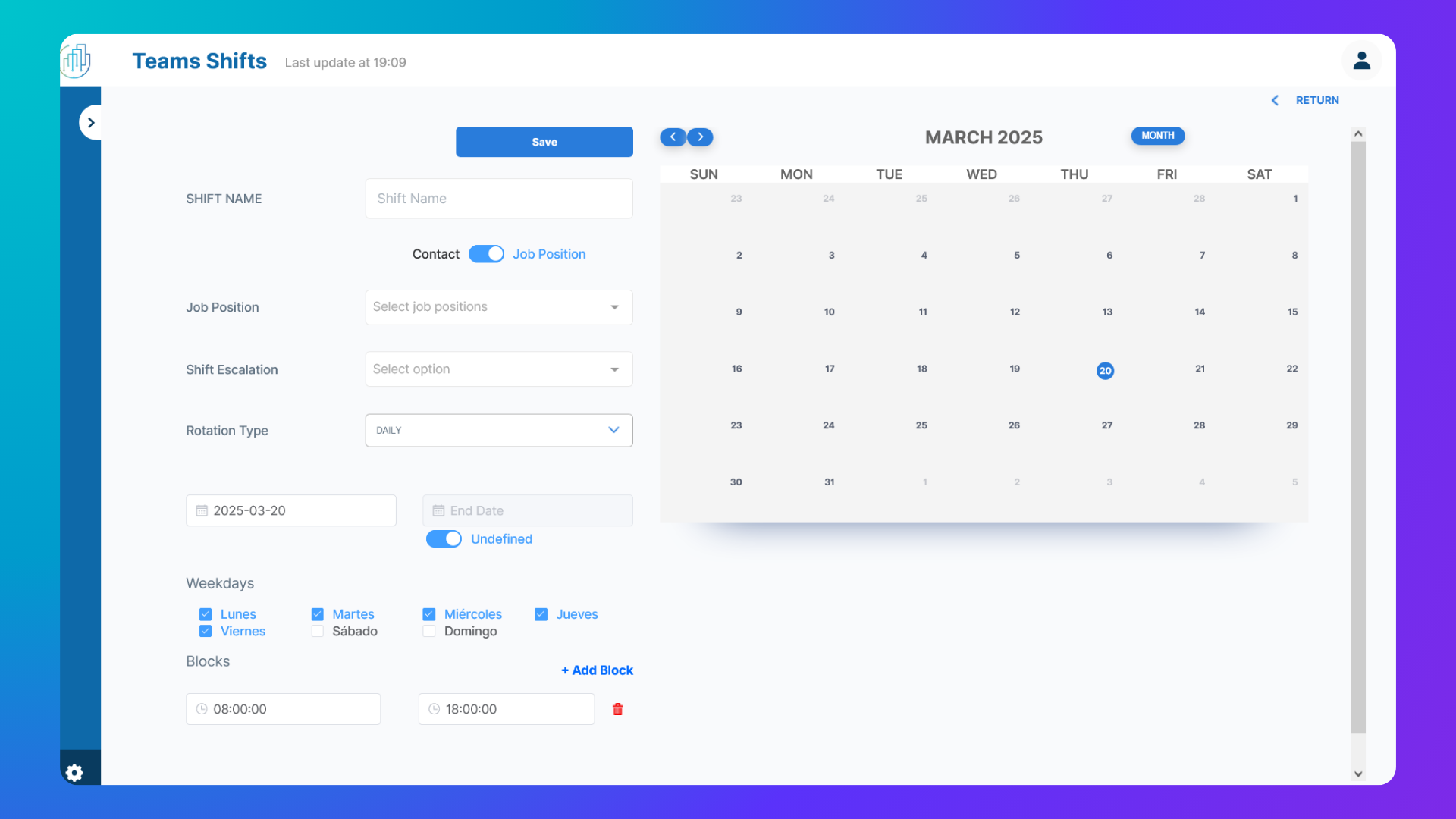
Shift Name: A descriptive name for the shift.
Contacts List: Assign one or more contacts to the shift.
Job Positions List: Assign one or more job positions to a shift.
Escalation Shift: Define a backup shift for unanswered notifications.
Rotation Type: Set the rotation pattern (daily, weekly, monthly, yearly, or time blocks).
Start & End Date: Specify the shift’s active period.
Days of the Week: Select active days (multiple selections allowed).
Time Blocks: Define specific start and end times within a day.
Note: Work teams can be created based on Contacts or Job Positions. As a best practice, we recommend creating them based on Job Positions, as this provides greater modularity and flexibility, making it easier to adapt to organizational changes and rotations.
Was this helpful?
Still need help? Ask the team